> ## Documentation Index
> Fetch the complete documentation index at: https://studio-docs.prem.io/llms.txt
> Use this file to discover all available pages before exploring further.
# Self-Hosting Fine-Tuned Models
> Learn how to self-host checkpoints using Hugging Face, VLLM and Ollama.
## Getting Started with Self-Hosting Checkpoints
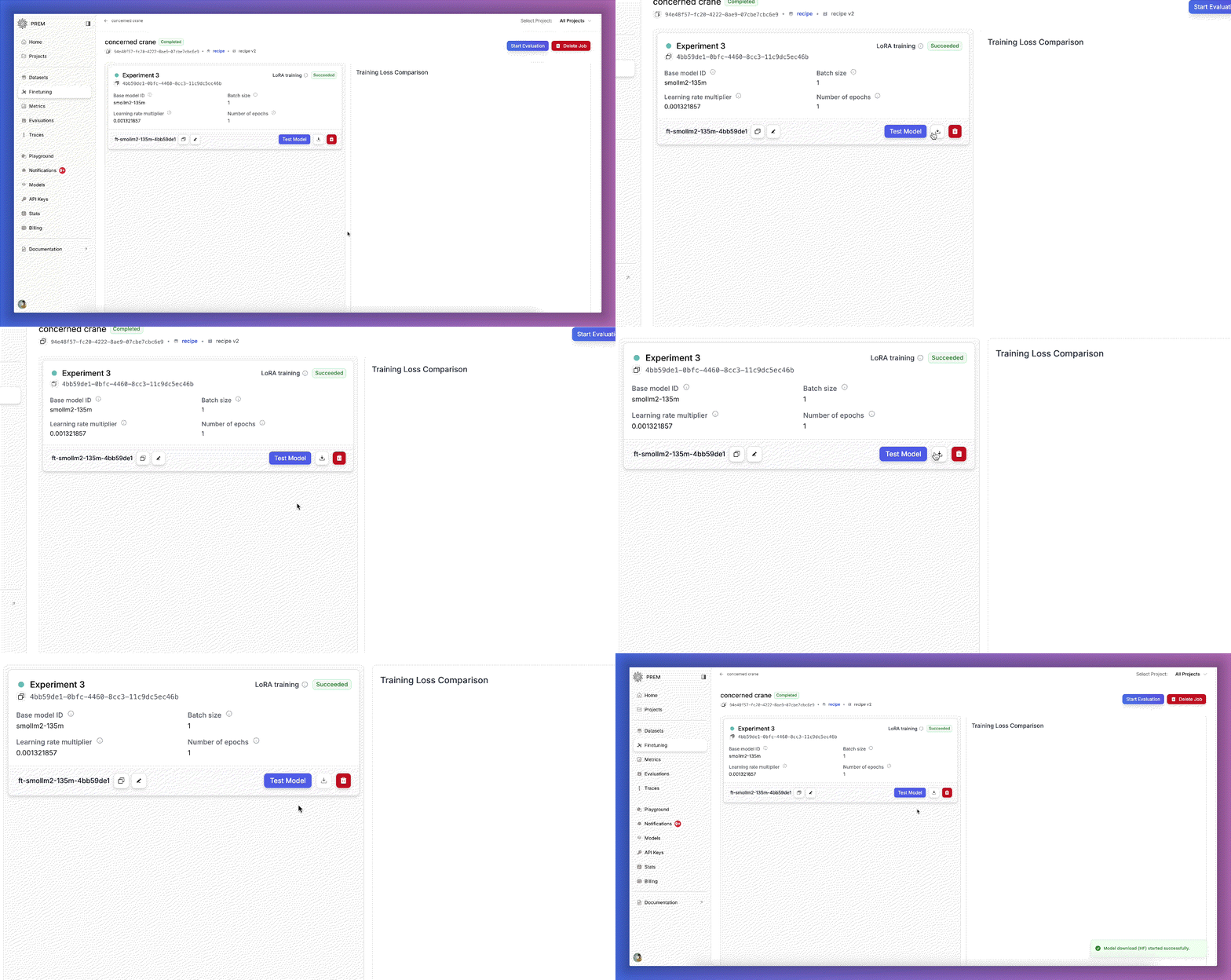
Here is how you can download the checkpoints from the studio after you have fine-tuned your model. Once you have
downloaded the checkpoints, you can unzip them and use the following inference engines to load the checkpoints and use them for inference.
 ***
## Inference Engines
You can use the following inference engines to load the checkpoints and use them for inference.
### Hugging Face
You can use the Hugging Face library to load the checkpoints and use them for inference using the [transformers](https://huggingface.co/docs/transformers/en/index) library.
```python Full Fine-Tuning theme={null}
from transformers import AutoModelForCausalLM, AutoTokenizer
import torch
model_path = 'path/to/your/finetuned/model/checkpoint'
tokenizer = AutoTokenizer.from_pretrained(model_path)
model = AutoModelForCausalLM.from_pretrained(model_path, torch_dtype=torch.bfloat16, device_map="auto")
SYSTEM_PROMPT = """You are a helpful recipe assistant. You are to extract the generic ingredients from each of the recipes provided."""
USER_PROMPT = """Title: Lemon Drizzle Cake
Ingredients: ["200g unsalted butter", "200g caster sugar", "4 eggs", "200g self-raising flour", "1 tsp baking powder", "zest of 1 lemon", "100ml lemon juice", "150g icing sugar"]
Generic ingredients:"""
conversation = [
{"role": "system", "content": SYSTEM_PROMPT},
{"role": "user", "content": USER_PROMPT},
]
# format and tokenize the tool use prompt
inputs = tokenizer.apply_chat_template(conversation, add_generation_prompt=True, return_dict=True, return_tensors="pt")
inputs.to(model.device)
outputs = model.generate(**inputs, max_new_tokens=1000, use_cache=False)
print(tokenizer.decode(outputs[0][inputs.input_ids.shape[1]:], skip_special_tokens=True))
```
```python LoRA Fine-Tuning theme={null}
from transformers import AutoModelForCausalLM, AutoTokenizer
import torch
from peft import PeftModel
lora_adapter_path = 'path/to/your/finetuned/lora_adapter/model/checkpoint'
base_model_path = 'path/to/your/base/model/checkpoint'
tokenizer = AutoTokenizer.from_pretrained(base_model_path)
model = AutoModelForCausalLM.from_pretrained(base_model_path, torch_dtype=torch.bfloat16, device_map="auto")
model = PeftModel.from_pretrained(model, lora_adapter_path)
SYSTEM_PROMPT = """You are a helpful recipe assistant. You are to extract the generic ingredients from each of the recipes provided."""
USER_PROMPT = """Title: Lemon Drizzle Cake
Ingredients: ["200g unsalted butter", "200g caster sugar", "4 eggs", "200g self-raising flour", "1 tsp baking powder", "zest of 1 lemon", "100ml lemon juice", "150g icing sugar"]
Generic ingredients:"""
conversation = [
{"role": "system", "content": SYSTEM_PROMPT},
{"role": "user", "content": USER_PROMPT},
]
# format and tokenize the tool use prompt
inputs = tokenizer.apply_chat_template(conversation, add_generation_prompt=True, return_dict=True, return_tensors="pt")
inputs.to(model.device)
outputs = model.generate(**inputs, max_new_tokens=1000, use_cache=False)
print(tokenizer.decode(outputs[0][inputs.input_ids.shape[1]:], skip_special_tokens=True))
```
***
### VLLM
You can use the VLLM library to load the checkpoints and use them for inference using the [VLLM](https://docs.vllm.ai/en/latest/) library.
```python Full Fine-Tuning theme={null}
from vllm import LLM, SamplingParams
model_path = 'path/to/your/finetuned/model/checkpoint'
llm = LLM(model=model_path, tokenizer=model_path)
SYSTEM_PROMPT = """You are a helpful recipe assistant. You are to extract the generic ingredients from each of the recipes provided."""
USER_PROMPT = """Title: Lemon Drizzle Cake
Ingredients: ["200g unsalted butter", "200g caster sugar", "4 eggs", "200g self-raising flour", "1 tsp baking powder", "zest of 1 lemon", "100ml lemon juice", "150g icing sugar"]
Generic ingredients:"""
conversation = [
{"role": "system", "content": SYSTEM_PROMPT},
{"role": "user", "content": USER_PROMPT},
]
outputs = llm.chat(
messages=conversation,
sampling_params=SamplingParams(temperature=0, max_tokens=256),
)
print(outputs[0].outputs[0].text)
```
```python LoRA Fine-Tuning theme={null}
from vllm import LLM, SamplingParams
from vllm.lora.request import LoRARequest
lora_adapter_path = 'path/to/your/finetuned/lora_adapter/model/checkpoint'
base_model_path = 'path/to/your/base/model/checkpoint'
llm = LLM(model=base_model_path, enable_lora=True, max_lora_rank=64)
SYSTEM_PROMPT = """You are a helpful recipe assistant. You are to extract the generic ingredients from each of the recipes provided."""
USER_PROMPT = """Title: Lemon Drizzle Cake
Ingredients: ["200g unsalted butter", "200g caster sugar", "4 eggs", "200g self-raising flour", "1 tsp baking powder", "zest of 1 lemon", "100ml lemon juice", "150g icing sugar"]
Generic ingredients:"""
conversation = [
{"role": "system", "content": SYSTEM_PROMPT},
{"role": "user", "content": USER_PROMPT},
]
outputs = llm.chat(
messages=conversation,
sampling_params=SamplingParams(temperature=0, max_tokens=256),
lora_request=LoRARequest(
lora_name="ingredients_lora_adapter",
lora_int_id=1,
lora_path=lora_adapter_path
)
)
print(outputs[0].outputs[0].text)
```
***
### Ollama
You can use the Ollama library to load the checkpoints and use them for inference using the [Ollama](https://ollama.com/) library.
To create a model, you first need to create a Modelfile:
```bash Full Fine-Tuning theme={null}
FROM path/to/finetuned/model/checkpoint
```
```bash LoRA Fine-Tuning theme={null}
FROM path/to/your/base/model/checkpoint
ADAPTER path/to/your/finetuned/lora_adapter/model/checkpoint
```
Then run the following command to create the model.
```bash Full Fine-Tuning theme={null}
ollama create my-model -f Modelfile
```
```bash LoRA Fine-Tuning theme={null}
ollama create my-model-lora -f Modelfile
```
Then you can use the model for inference:
```python Full Fine-Tuning theme={null}
from ollama import Client
client = Client(host='http://localhost:11434')
SYSTEM_PROMPT = """You are a helpful recipe assistant. You are to extract the generic ingredients from each of the recipes provided."""
USER_PROMPT = """Title: Lemon Drizzle Cake
Ingredients: ["200g unsalted butter", "200g caster sugar", "4 eggs", "200g self-raising flour", "1 tsp baking powder", "zest of 1 lemon", "100ml lemon juice", "150g icing sugar"]
Generic ingredients:"""
conversation = [
{"role": "system", "content": SYSTEM_PROMPT},
{"role": "user", "content": USER_PROMPT},
]
res = client.chat(model='my-model', messages=conversation)
print(res.message.content)
```
```python LoRA Fine-Tuning theme={null}
from ollama import Client
client = Client(host='http://localhost:11434')
SYSTEM_PROMPT = """You are a helpful recipe assistant. You are to extract the generic ingredients from each of the recipes provided."""
USER_PROMPT = """Title: Lemon Drizzle Cake
Ingredients: ["200g unsalted butter", "200g caster sugar", "4 eggs", "200g self-raising flour", "1 tsp baking powder", "zest of 1 lemon", "100ml lemon juice", "150g icing sugar"]
Generic ingredients:"""
conversation = [
{"role": "system", "content": SYSTEM_PROMPT},
{"role": "user", "content": USER_PROMPT},
]
res = client.chat(model='my-model-lora', messages=conversation)
print(res.message.content)
```
***
## Inference Engines
You can use the following inference engines to load the checkpoints and use them for inference.
### Hugging Face
You can use the Hugging Face library to load the checkpoints and use them for inference using the [transformers](https://huggingface.co/docs/transformers/en/index) library.
```python Full Fine-Tuning theme={null}
from transformers import AutoModelForCausalLM, AutoTokenizer
import torch
model_path = 'path/to/your/finetuned/model/checkpoint'
tokenizer = AutoTokenizer.from_pretrained(model_path)
model = AutoModelForCausalLM.from_pretrained(model_path, torch_dtype=torch.bfloat16, device_map="auto")
SYSTEM_PROMPT = """You are a helpful recipe assistant. You are to extract the generic ingredients from each of the recipes provided."""
USER_PROMPT = """Title: Lemon Drizzle Cake
Ingredients: ["200g unsalted butter", "200g caster sugar", "4 eggs", "200g self-raising flour", "1 tsp baking powder", "zest of 1 lemon", "100ml lemon juice", "150g icing sugar"]
Generic ingredients:"""
conversation = [
{"role": "system", "content": SYSTEM_PROMPT},
{"role": "user", "content": USER_PROMPT},
]
# format and tokenize the tool use prompt
inputs = tokenizer.apply_chat_template(conversation, add_generation_prompt=True, return_dict=True, return_tensors="pt")
inputs.to(model.device)
outputs = model.generate(**inputs, max_new_tokens=1000, use_cache=False)
print(tokenizer.decode(outputs[0][inputs.input_ids.shape[1]:], skip_special_tokens=True))
```
```python LoRA Fine-Tuning theme={null}
from transformers import AutoModelForCausalLM, AutoTokenizer
import torch
from peft import PeftModel
lora_adapter_path = 'path/to/your/finetuned/lora_adapter/model/checkpoint'
base_model_path = 'path/to/your/base/model/checkpoint'
tokenizer = AutoTokenizer.from_pretrained(base_model_path)
model = AutoModelForCausalLM.from_pretrained(base_model_path, torch_dtype=torch.bfloat16, device_map="auto")
model = PeftModel.from_pretrained(model, lora_adapter_path)
SYSTEM_PROMPT = """You are a helpful recipe assistant. You are to extract the generic ingredients from each of the recipes provided."""
USER_PROMPT = """Title: Lemon Drizzle Cake
Ingredients: ["200g unsalted butter", "200g caster sugar", "4 eggs", "200g self-raising flour", "1 tsp baking powder", "zest of 1 lemon", "100ml lemon juice", "150g icing sugar"]
Generic ingredients:"""
conversation = [
{"role": "system", "content": SYSTEM_PROMPT},
{"role": "user", "content": USER_PROMPT},
]
# format and tokenize the tool use prompt
inputs = tokenizer.apply_chat_template(conversation, add_generation_prompt=True, return_dict=True, return_tensors="pt")
inputs.to(model.device)
outputs = model.generate(**inputs, max_new_tokens=1000, use_cache=False)
print(tokenizer.decode(outputs[0][inputs.input_ids.shape[1]:], skip_special_tokens=True))
```
***
### VLLM
You can use the VLLM library to load the checkpoints and use them for inference using the [VLLM](https://docs.vllm.ai/en/latest/) library.
```python Full Fine-Tuning theme={null}
from vllm import LLM, SamplingParams
model_path = 'path/to/your/finetuned/model/checkpoint'
llm = LLM(model=model_path, tokenizer=model_path)
SYSTEM_PROMPT = """You are a helpful recipe assistant. You are to extract the generic ingredients from each of the recipes provided."""
USER_PROMPT = """Title: Lemon Drizzle Cake
Ingredients: ["200g unsalted butter", "200g caster sugar", "4 eggs", "200g self-raising flour", "1 tsp baking powder", "zest of 1 lemon", "100ml lemon juice", "150g icing sugar"]
Generic ingredients:"""
conversation = [
{"role": "system", "content": SYSTEM_PROMPT},
{"role": "user", "content": USER_PROMPT},
]
outputs = llm.chat(
messages=conversation,
sampling_params=SamplingParams(temperature=0, max_tokens=256),
)
print(outputs[0].outputs[0].text)
```
```python LoRA Fine-Tuning theme={null}
from vllm import LLM, SamplingParams
from vllm.lora.request import LoRARequest
lora_adapter_path = 'path/to/your/finetuned/lora_adapter/model/checkpoint'
base_model_path = 'path/to/your/base/model/checkpoint'
llm = LLM(model=base_model_path, enable_lora=True, max_lora_rank=64)
SYSTEM_PROMPT = """You are a helpful recipe assistant. You are to extract the generic ingredients from each of the recipes provided."""
USER_PROMPT = """Title: Lemon Drizzle Cake
Ingredients: ["200g unsalted butter", "200g caster sugar", "4 eggs", "200g self-raising flour", "1 tsp baking powder", "zest of 1 lemon", "100ml lemon juice", "150g icing sugar"]
Generic ingredients:"""
conversation = [
{"role": "system", "content": SYSTEM_PROMPT},
{"role": "user", "content": USER_PROMPT},
]
outputs = llm.chat(
messages=conversation,
sampling_params=SamplingParams(temperature=0, max_tokens=256),
lora_request=LoRARequest(
lora_name="ingredients_lora_adapter",
lora_int_id=1,
lora_path=lora_adapter_path
)
)
print(outputs[0].outputs[0].text)
```
***
### Ollama
You can use the Ollama library to load the checkpoints and use them for inference using the [Ollama](https://ollama.com/) library.
To create a model, you first need to create a Modelfile:
```bash Full Fine-Tuning theme={null}
FROM path/to/finetuned/model/checkpoint
```
```bash LoRA Fine-Tuning theme={null}
FROM path/to/your/base/model/checkpoint
ADAPTER path/to/your/finetuned/lora_adapter/model/checkpoint
```
Then run the following command to create the model.
```bash Full Fine-Tuning theme={null}
ollama create my-model -f Modelfile
```
```bash LoRA Fine-Tuning theme={null}
ollama create my-model-lora -f Modelfile
```
Then you can use the model for inference:
```python Full Fine-Tuning theme={null}
from ollama import Client
client = Client(host='http://localhost:11434')
SYSTEM_PROMPT = """You are a helpful recipe assistant. You are to extract the generic ingredients from each of the recipes provided."""
USER_PROMPT = """Title: Lemon Drizzle Cake
Ingredients: ["200g unsalted butter", "200g caster sugar", "4 eggs", "200g self-raising flour", "1 tsp baking powder", "zest of 1 lemon", "100ml lemon juice", "150g icing sugar"]
Generic ingredients:"""
conversation = [
{"role": "system", "content": SYSTEM_PROMPT},
{"role": "user", "content": USER_PROMPT},
]
res = client.chat(model='my-model', messages=conversation)
print(res.message.content)
```
```python LoRA Fine-Tuning theme={null}
from ollama import Client
client = Client(host='http://localhost:11434')
SYSTEM_PROMPT = """You are a helpful recipe assistant. You are to extract the generic ingredients from each of the recipes provided."""
USER_PROMPT = """Title: Lemon Drizzle Cake
Ingredients: ["200g unsalted butter", "200g caster sugar", "4 eggs", "200g self-raising flour", "1 tsp baking powder", "zest of 1 lemon", "100ml lemon juice", "150g icing sugar"]
Generic ingredients:"""
conversation = [
{"role": "system", "content": SYSTEM_PROMPT},
{"role": "user", "content": USER_PROMPT},
]
res = client.chat(model='my-model-lora', messages=conversation)
print(res.message.content)
```